Tu show, en una sola pantalla.Your show, on one screen.
Prepara el setlist, dirige los cambios en vivo y comparte con cada músico lo que necesita. Control de Ableton Live en una o dos Mac, desde las pantallas de tu red.
Prepare your setlist, direct changes live and give each player the view they need. Control Ableton Live on one or two Macs, from screens on your network.
14 días completos, sin tarjeta. Después se activa con un código, sin conexión.
14 full days, no card. Then it activates with a code, offline.
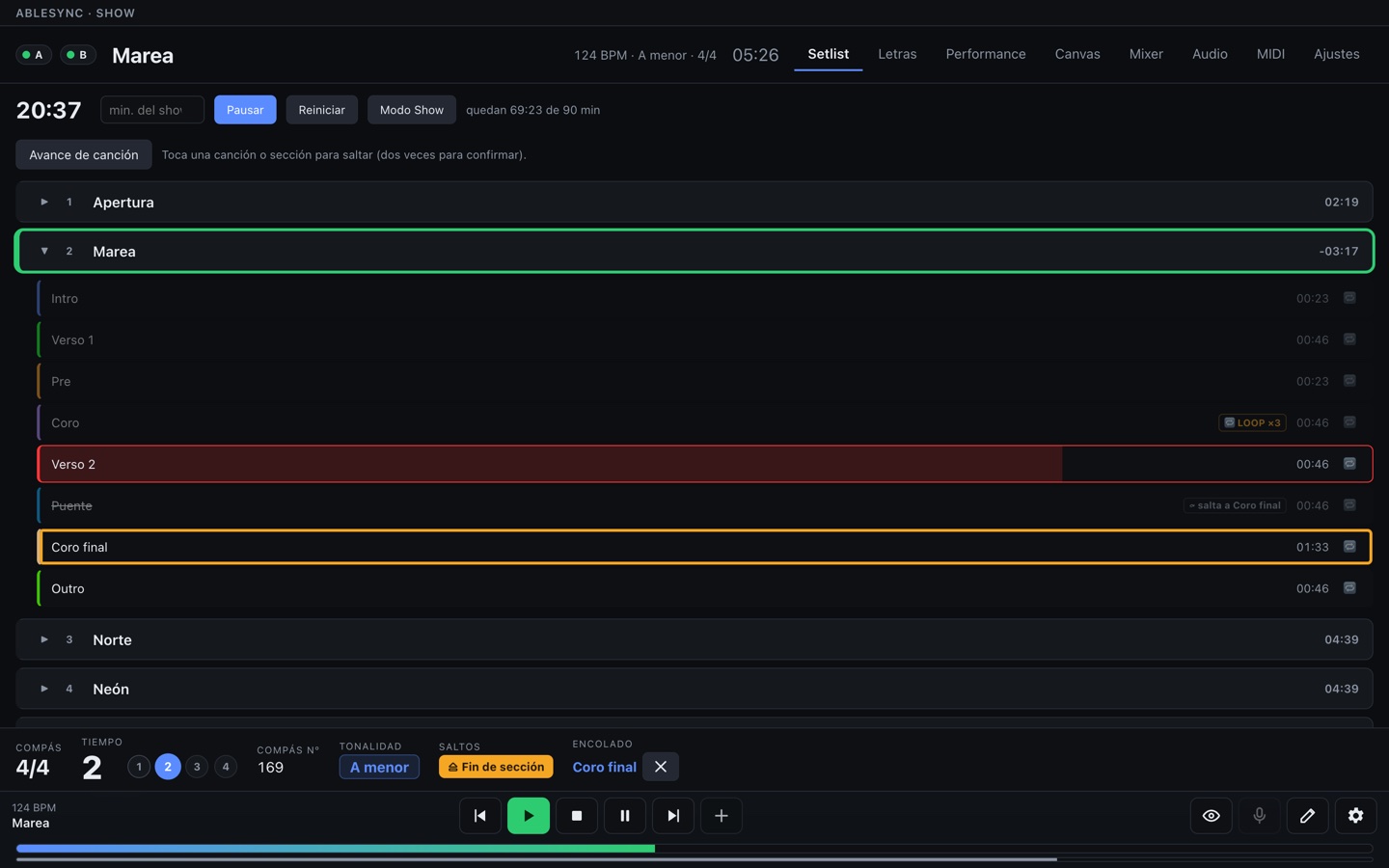
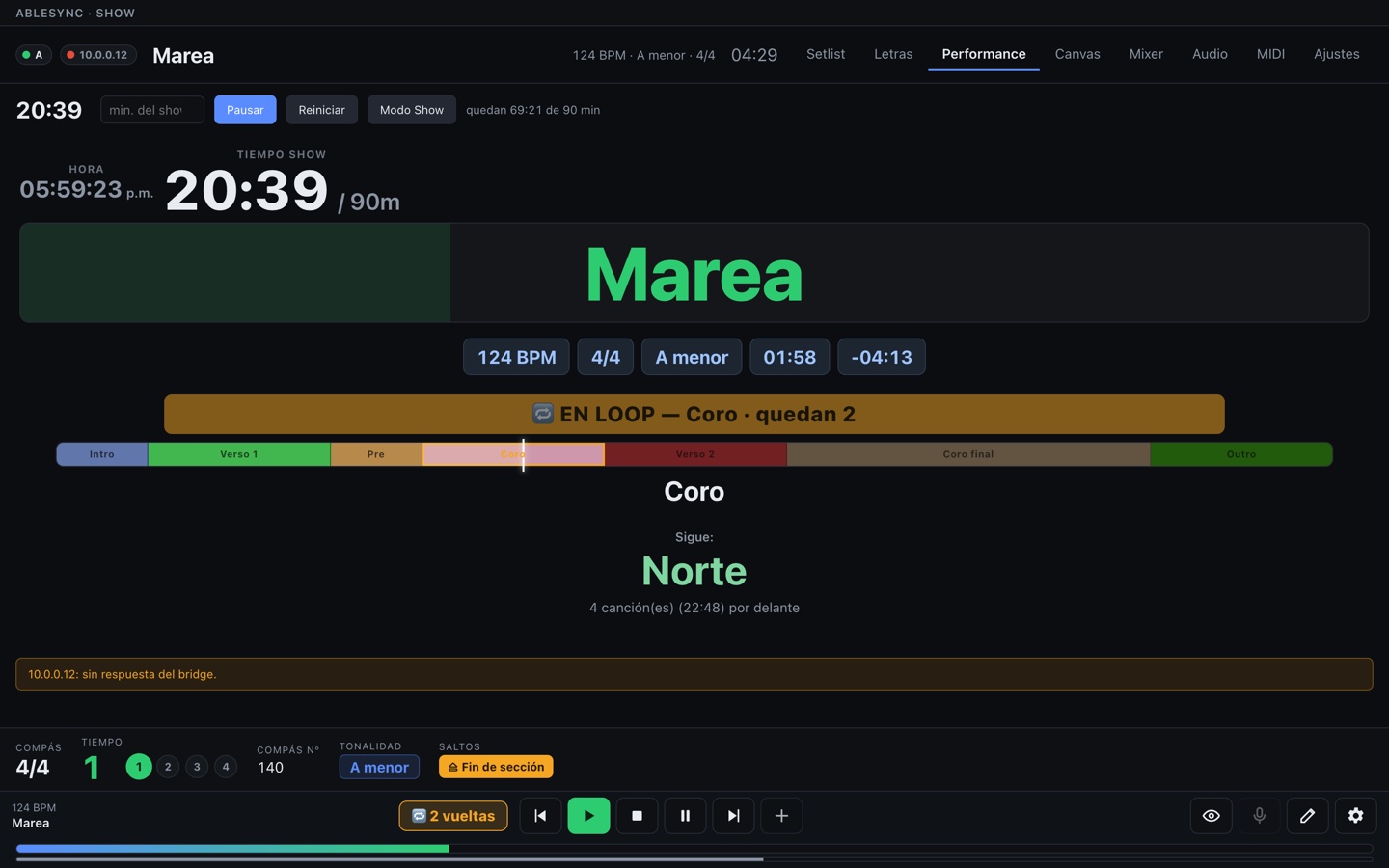
RealRealDashboard real de AbleSync con un show de ejemplo. El Coro tiene +LOOP:3: faltan dos vueltas, y se ve desde cualquier pestaña.AbleSync's real dashboard with a sample show. The Chorus has +LOOP:3: two passes left, visible from any tab. The app interface is in Spanish for now.
Por qué AbleSyncWhy AbleSync
Cuando el show cambia, tienes el control a la vista.When the show changes, keep control in view.
Prepara con claridadPrepare with clarity
De los Locators al setlist. Una guía para empezar y una revisión por Mac para ver qué falta antes de tocar.
From locators to setlist. A guide to get started and checks for each Mac to see what's missing before you play.
Responde al escenarioRespond to the stage
Encola el próximo coro, repite una sección o cambia el orden. Canción, siguiente salto y estado A/B comparten pantalla.
Queue the next chorus, repeat a section or change the order. Song, next jump and A/B status share one screen.
Dale a cada quien su lugarGive everyone their view
Tu superficie de control, las letras para el escenario y la mezcla personal de cada músico. Con permisos para cada función.
Your control surface, lyrics for the stage and each player's personal mix. With permissions for each role.
Un camino claro para empezar.A clear path to get started.
Abre Preparar show en el dashboard. La guía distingue una Mac desconectada, Live sin responder y una sesión sin canciones: sabes qué revisar sin empezar de cero.
Open Preparar show (Prepare show) in the dashboard. The guide distinguishes a disconnected Mac, an unresponsive Live and a session without songs, so you know what to check next.
Pronto en la App StoreComing soon to the App Store
Canvas y Monitor son compañeras gratuitas de AbleSync para Mac. Necesitan la Mac para controlar una sesión; el modo demo se puede usar sin ella. El dashboard en navegador ya funciona sin instalar una app de iOS.
Canvas and Monitor are free companions to AbleSync for Mac. They need the Mac to control a session; demo mode works without it. The browser dashboard already works without an iOS app.
16:00ArmadoLoad-in
Todo vive en los nombres que ya hay en tu sesión.Everything lives in names that already exist in your session.
Las canciones son Locators, las secciones son clips y las banderas se escriben en el nombre. No hay una segunda base de datos que se pueda desincronizar de tu Ableton.
Songs are locators, sections are clips, and the flags go in the name. There's no second database to drift out of sync with your Ableton.
En AbletonIn Ableton
En AbleSyncIn AbleSync
MareaLocator
Una canción del setlist.A song in the setlist.
Coro +LOOP:3Chorus +LOOP:3
La sección se repite tres veces y sigue. En pantalla se ve cuántas vueltas faltan.The section repeats three times, then moves on. The screen shows how many passes are left.
Intro >>> CoroIntro >>> Chorus
Al terminar la Intro, salta al Coro.When the Intro ends, it jumps to the Chorus.
Puente +SKIPBridge +SKIP
Se la salta al llegar.Skipped when reached.
En pantalla el nombre se lee limpio: Coro, no toda la notación.
On screen the name reads clean: Chorus, not the whole notation.
Los botones que tú usas, donde tú los quieres.The buttons you use, where you want them.
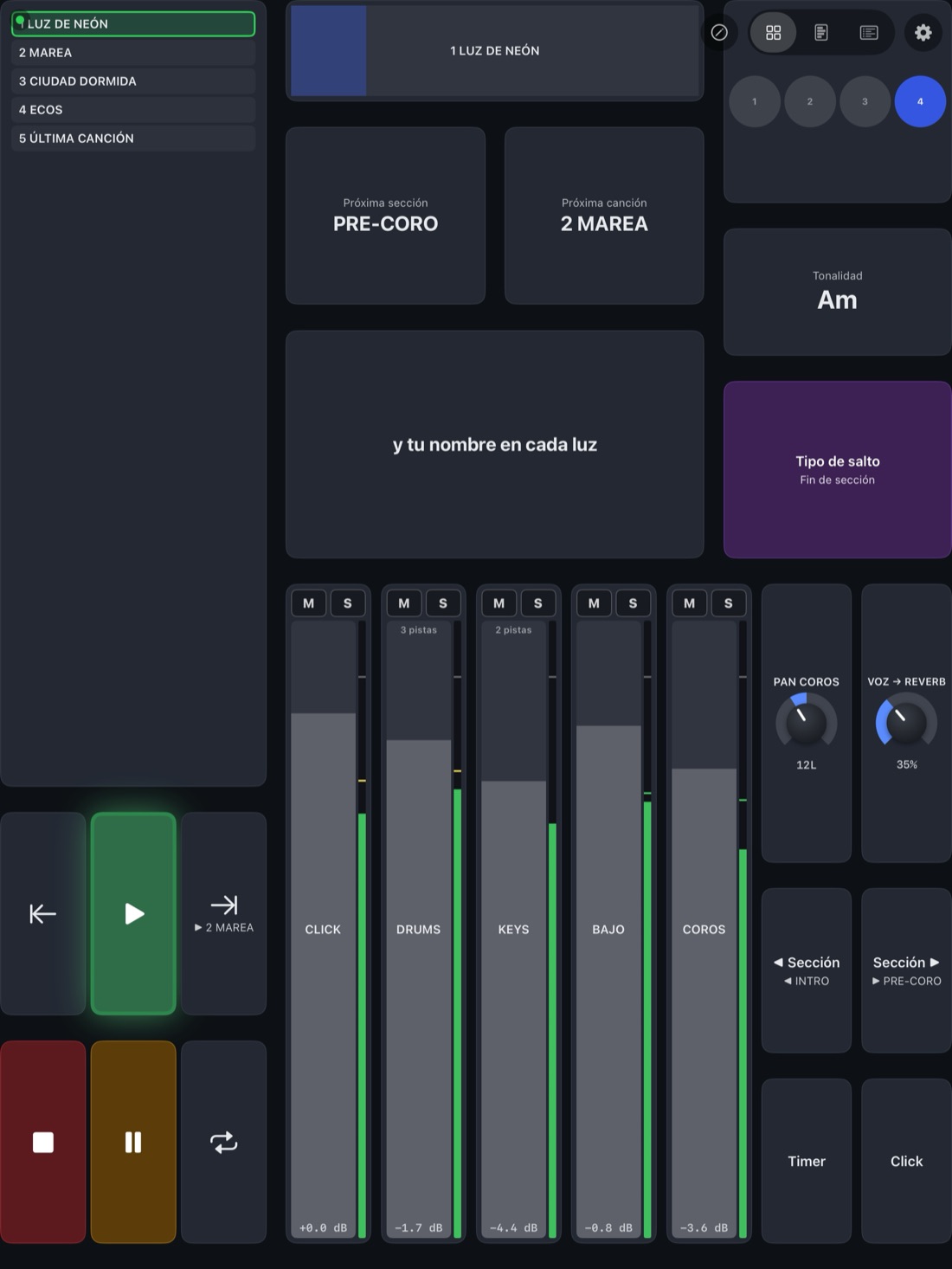
El Canvas es tu superficie de control: transporte, saltos, faders, letra, talkback y perillas, acomodados a tu manera. Empiezas de un preset (Show completo, Transporte, Mezcla, Baterista, Atril) y los faders se llenan con los canales de tu set.
The Canvas is your control surface: transport, jumps, faders, lyrics, talkback and knobs, laid out your way. Start from a preset (Full show, Transport, Mix, Drummer, Lyrics stand) and the faders fill with your set's channels.
Las perillas mueven MIDI CC, volumen, paneo, envíos o el parámetro de un plugin. Encuentran el plugin por su nombre: si lo cambias de lugar en la cadena, la perilla lo sigue; si lo quitas, no mueve otra cosa.
Knobs move MIDI CC, volume, pan, sends or a plugin parameter. They find the plugin by name: move it along the chain and the knob follows; remove it and the knob doesn't grab something else.
En Canvas para iPhone y iPad, gratis con tu licencia de la Mac, por red o por cable USB. El mismo Canvas se abre en el navegador.
In Canvas for iPhone and iPad, free with your Mac licence, over the network or a USB cable. The same Canvas opens in the browser.
RealLa app de iPad en modo demo, con el preset Show completo.The iPad app in demo mode, with the Full show preset.
18:30Prueba de sonidoSoundcheck
Revisa cada Mac antes de abrir puertas.Check each Mac before doors open.
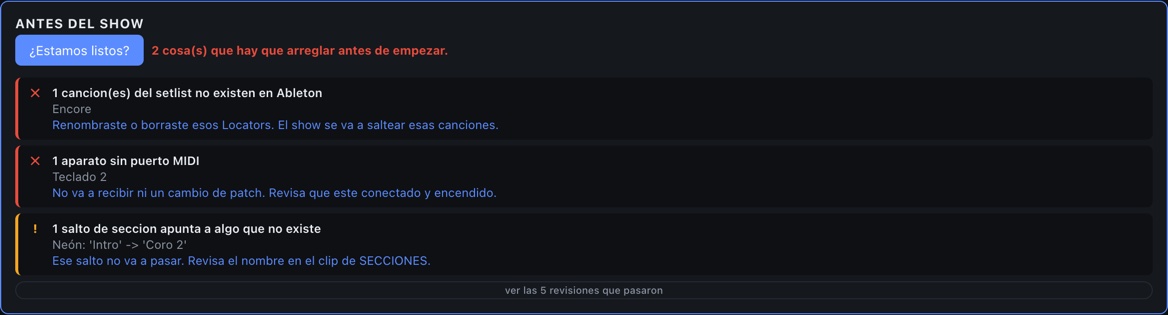
Los errores que arruinan un show no son técnicos: son de armado, y son invisibles hasta que suenan. Esto revisa que las canciones del setlist sigan existiendo en Ableton, que ningún salto apunte a una sección borrada, que cada aparato MIDI tenga puerto y que el número de compás esté bien medido.
The mistakes that ruin a show aren't technical — they're build mistakes, and they're invisible until they're audible. This checks that your setlist songs still exist in Ableton, that no jump points at a deleted section, that every MIDI device has a port, and that the bar count is properly measured.
RealDashboard real con un show de ejemplo. Cada aviso dice qué pasa y qué hacer; nada de códigos de error.The real dashboard with a sample show. Every warning says what's wrong and what to do — no error codes. The app interface is in Spanish for now; English is in progress.
19:15MonitoresMonitors
«Más de mí, menos click», sin hacerte señas."More me, less click", without the hand signals.
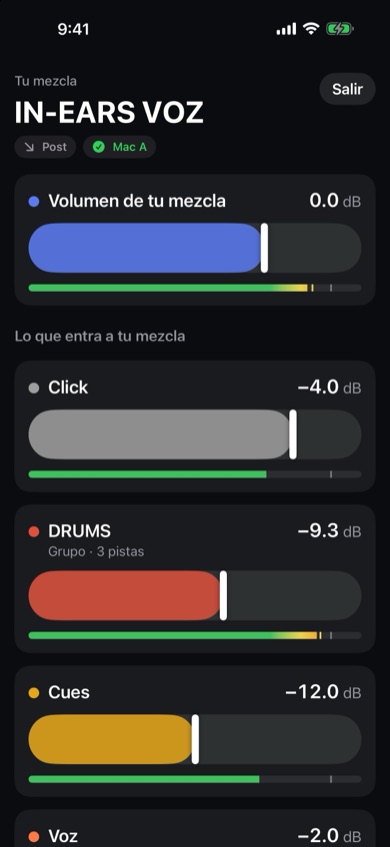
Con AbleSync Monitor, una app gratis, cada músico mezcla sus in-ears desde su iPhone o iPad. Su clave lo amarra a su Return de Ableton: mueve cuánto entra de cada canal y su volumen. No puede tocar el Main, la mezcla de otro ni el transporte.
With AbleSync Monitor, a free app, each musician mixes their own in-ears from their iPhone or iPad. Their key ties them to their Return in Ableton: they move how much of each channel goes in, and its level. They can't touch the Main, anyone else's mix or the transport.
Cada fader trae un VU en dB, como el de Ableton. Si lo permites, el músico agrega los canales que le falten. Y una mezcla nueva la armas en un clic desde la Mac: todo a un nivel de partida, o copiada de otro Return.
Every fader has a dB meter, like Ableton's. If you allow it, musicians add the channels they're missing. And a new mix takes one click on the Mac: everything at a starting level, or copied from another Return.
¿Returns en Pre? Un Utility llamado PRE MUTE en el talkback, el click y las guías hace que tu mute también las calle en los in-ears.
Pre-fader Returns? A Utility named PRE MUTE on talkback, click and guides makes your mute silence them in the in-ears too.
RealAbleSync Monitor en modo demo.AbleSync Monitor in demo mode.
20:50PuertasDoors
Cambian el orden diez minutos antes de abrir. Lo arrastras, y eso es lo que suena.The order changes ten minutes before doors. You drag it, and that's what plays.
El setlist se arma en AbleSync, no moviendo clips en Ableton. Pausas de N segundos o «espera mi play» por canción. Un archivo por fecha, la misma sesión de Ableton para toda la gira.
The setlist lives in AbleSync, not in moving clips around in Ableton. Per-song gaps in seconds, or "wait for my play". One file per date, the same Ableton project for the whole tour.
21:00ShowShow
Saltos que no se oyen.Jumps you don't hear.
Alguien pide desde el escenario repetir el coro, o cortar directo al final. Tú eliges cuándo cae el salto, y lo que suena termina de sonar.
Someone on stage calls for another chorus, or a cut straight to the end. You choose where the jump lands, and what's playing plays out.
Al compásOn the barEn el siguiente uno.On the next downbeat.
Fin de secciónEnd of sectionCuando termine la que suena.When the current one ends.
Fin de canciónEnd of songSin cortar el tema.Without cutting the song.
YaNowPara cuando no hay tiempo.For when there's no time.
RealCoro final encolado para cuando termine el Verso 2 (abajo, en «Encolado», con su botón para cancelar). El Puente tiene +SKIP: tachado, y avisa a dónde salta.Final chorus queued for the end of Verse 2 (bottom, under "Encolado", with its cancel button). The Bridge has +SKIP: struck through, and it says where it jumps to.
Y una pantalla por persona: el baterista ve compás y metrónomo; quien canta, la letra en grande. Las pantallas de solo lectura ven todo y no mandan nada.
And a screen per person: the drummer gets the bar count and click; the singer gets huge lyrics. View-only screens see everything and send nothing.
Le encolas el puente, y el cue dice «puente».Queue the bridge, and the cue says "bridge".
AbleSync dice la sección que viene uno o dos compases antes, en los in-ears, y dice a dónde vas a ir de verdad: respeta los saltos encolados, >>>, +SKIP y los loops. Un clip de cue grabado diría «coro» aunque brincaras al puente.
AbleSync calls the next section one or two bars ahead, in the in-ears, and calls where you're actually going: it follows queued jumps, >>>, +SKIP and loops. A recorded cue clip would say "chorus" even if you jumped to the bridge.
En español o en inglés, con conteo «1, 2, 3, 4» si lo quieres. Los cues se programan con adelanto según el tempo de la sesión.
In Spanish or English, with a "1, 2, 3, 4" count if you want it. Cues are scheduled ahead of time using the session tempo.
Viene apagado. La pista CUES VOZ de la plantilla viene con voces en español e inglés, listas para usar; si prefieres otras (las tuyas o un paquete de cues que tengas), AbleSync arma tu pista con ellas desde Ajustes.
It ships off. The template's CUES VOZ track comes with Spanish and English voices, ready to use; if you'd rather use others (your own, or a cue pack you own), AbleSync builds your track with them from Settings.
Ableton toca. AbleSync mira, manda y muestra.Ableton plays. AbleSync watches, sends and shows.
El audio es de Ableton, no de AbleSync. Si el puente de una Mac se cae, Ableton sigue tocando: pierdes el control y el prompter de esa máquina, no el show. Las dos Mac corren la misma sesión y AbleSync les manda a las dos las mismas órdenes, sin Ableton Link: con Link, la automatización de tempo de tu sesión se apaga sola. El cambio de audio lo haces tú, a mano, a propósito: un switch automático en vivo es un punto de falla más, no uno menos.
The audio is Ableton's, not AbleSync's. If one Mac's bridge dies, Ableton keeps playing: you lose control and the prompter for that machine, not the show. Both Macs run the same Live Set and AbleSync sends both the same commands, without Ableton Link: with Link on, it overrides your Set's tempo automation. You switch audio by hand, on purpose — an automatic switch on stage is one more thing that can fail, not one less.
Diagrama: Mac A y Mac B corren la misma sesión de Ableton Live y un puente cada una, sin Ableton Link entre ellas. Las dos se conectan por WebSocket a un navegador cualquiera de la red, que les manda los comandos a la vez.Diagram: Mac A and Mac B each run the same Ableton Live Set and a bridge, with no Ableton Link between them. Both connect over WebSocket to any browser on the network, which sends commands to both at once.
Los comandos salen a las dos Mac a la vez. El cambio de audio lo haces tú.Commands go to both Macs at once. You make the audio switch.
RealSe cayó el puente de la Mac B: su indicador pasa a rojo y aparece el aviso. La A sigue en verde, el cabezal sigue corriendo y el navegador se reconecta solo cuando la B vuelve.Mac B's bridge went down: its indicator turns red and a warning appears. Mac A stays green, the playhead keeps moving, and the browser reconnects on its own when B comes back.
00:30DesmontajeLoad-out
Pruébalo en tu próximo ensayo.Try it at your next rehearsal.
14 días completos, sin funciones recortadas. Después, 150 USD una sola vez, para tus dos Mac y con actualizaciones de por vida.
14 full days, nothing held back. After that, 150 USD once, for both your Macs, with lifetime updates.