Lo que hace, y lo que todavía no.What it does, and what it doesn't yet.
AbleSync lee tu sesión de Ableton por nombres, manda los comandos a las dos Mac a la vez y lo muestra en cualquier navegador de tu red.
AbleSync reads your Ableton session by name, sends commands to both Macs at once, and shows it all in any browser on your network.
Lo más reciente.The latest.
Las actualizaciones son gratis y AbleSync te avisa cuando hay una. Esto es lo que entró en las últimas.
Updates are free, and AbleSync tells you when there's one. Here's what went into the latest ones.
- oct 2026Cues de voz automáticos. AbleSync dice la sección que viene, uno o dos compases antes, y respeta tus saltos.
- oct 2026Ajustes plegables. Cada sección de Ajustes del dashboard se pliega con una flecha.
- sep 2026Perillas en el Canvas (Mac e iPad): MIDI CC, volumen, paneo, envíos a Returns y parámetros de plugins o macros de un Rack.
- sep 2026Presets al crear un Canvas en el iPad: Show completo, Transporte, Mezcla, Baterista y Atril.
- sep 2026AbleSync Monitor: un VU en cada fader, el músico puede agregar canales a su mezcla y el ingeniero puede armar una mezcla en un clic desde la Mac.
- sep 2026PRE MUTE: con Returns de monitoreo en Pre, el mute del talkback, el click y las guías también las calla en los in-ears.
- sep 2026Arreglo: al actualizar con un iPad conectado ya no sale un aviso falso de «puerto ocupado».
- Oct 2026Automatic voice cues. AbleSync calls the next section one or two bars ahead, and follows your jumps.
- Oct 2026Collapsible settings. Each section of the dashboard's Settings folds away with an arrow.
- Sep 2026Knobs on the Canvas (Mac and iPad): MIDI CC, volume, pan, sends to Returns, and plugin parameters or Rack macros.
- Sep 2026Presets for a new Canvas on the iPad: Full show, Transport, Mix, Drummer and Lyrics stand.
- Sep 2026AbleSync Monitor: a meter on every fader, musicians can add channels to their own mix, and the engineer can build a mix in one click from the Mac.
- Sep 2026PRE MUTE: with monitor Returns set to Pre, muting talkback, click and guides also silences them in the in-ears.
- Sep 2026Fix: updating with an iPad connected no longer shows a false "port in use" warning.
El setlist se arma aquí.The setlist lives here.
Las canciones salen de los Locators de tu Arrangement. Las arrastras al orden de la noche y eso es lo que suena. Entre canción y canción, una pausa de N segundos o «espera mi play». Un archivo por fecha, la misma sesión de Ableton para toda la gira.
Songs come from the locators in your Arrangement. Drag them into tonight's order and that's what plays. Between songs, a gap of N seconds or "wait for my play". One file per date, the same Ableton project for the whole tour.
El setlist se comparte: lo que cambias en una pantalla lo ven todas.
The setlist is shared: change it on one screen and every screen sees it.
Banderas en el nombre del clip.Flags in the clip name.
Las secciones son clips en un track llamado SECCIONES (o SECTIONS). Lo que hace cada una se escribe en su nombre, y se puede combinar. En pantalla el nombre se lee limpio.
Sections are clips on a track called SECTIONS (or SECCIONES). What each one does goes in its name, and flags combine. On screen the name reads clean.
| NotaciónNotation | Qué haceWhat it does |
|---|---|
+LOOP | Repite la sección hasta que pidas la siguiente.Repeats the section until you call the next one. |
+LOOP:5 | La repite cinco veces y sigue. En pantalla se ve cuántas vueltas faltan.Repeats it five times, then moves on. The screen shows how many passes are left. |
+SKIP | Se la salta al llegar. Si hay varias seguidas, las salta todas.Skipped when reached. If several in a row have it, they're all skipped. |
+PAUSE | Al terminar el clip, Ableton frena. El siguiente Play reanuda justo ahí.When the clip ends, Ableton stops. The next Play resumes right there. |
>>> CoroChorus | Al terminar, salta adelante a esa sección.When it ends, jumps forward to that section. |
<<< VersoVerse | Igual, pero hacia atrás.Same, but backwards. |
{textotext} | Una descripción, atenuada, para no confundirla con el nombre.A description, dimmed, so it isn't mistaken for the name. |
+SKIP, >>> y <<< valen una vez por pasada: si vuelves a pasar por esa sección en la misma canción, suena entera.
+SKIP, >>> and <<< fire once per pass: come back through that section in the same song and it plays in full.
Saltos que no se oyen.Jumps you don't hear.
El salto cae al compás, al final de la sección, al final de la canción, o ya mismo. En «fin de sección», lo que suena termina de sonar. Los saltos entre secciones van programados con adelanto: el disparo es exacto.
Land the jump on the bar, at the end of the section, at the end of the song, or right now. On "end of section", what's playing plays out. Section jumps are scheduled ahead of time, so they fire exactly.
El límite honesto: el paso entre canciones se detecta cinco veces por segundo. Si tus temas están pegados sin espacio, puedes oír un pedacito del equivocado. Si necesitas precisión en un límite, ponlo como sección.
The honest limit: the change between songs is polled five times a second. If your songs butt up against each other with no gap, you can hear a sliver of the wrong one. If a boundary needs to be exact, make it a section.
Una pantalla por persona.A screen per person.
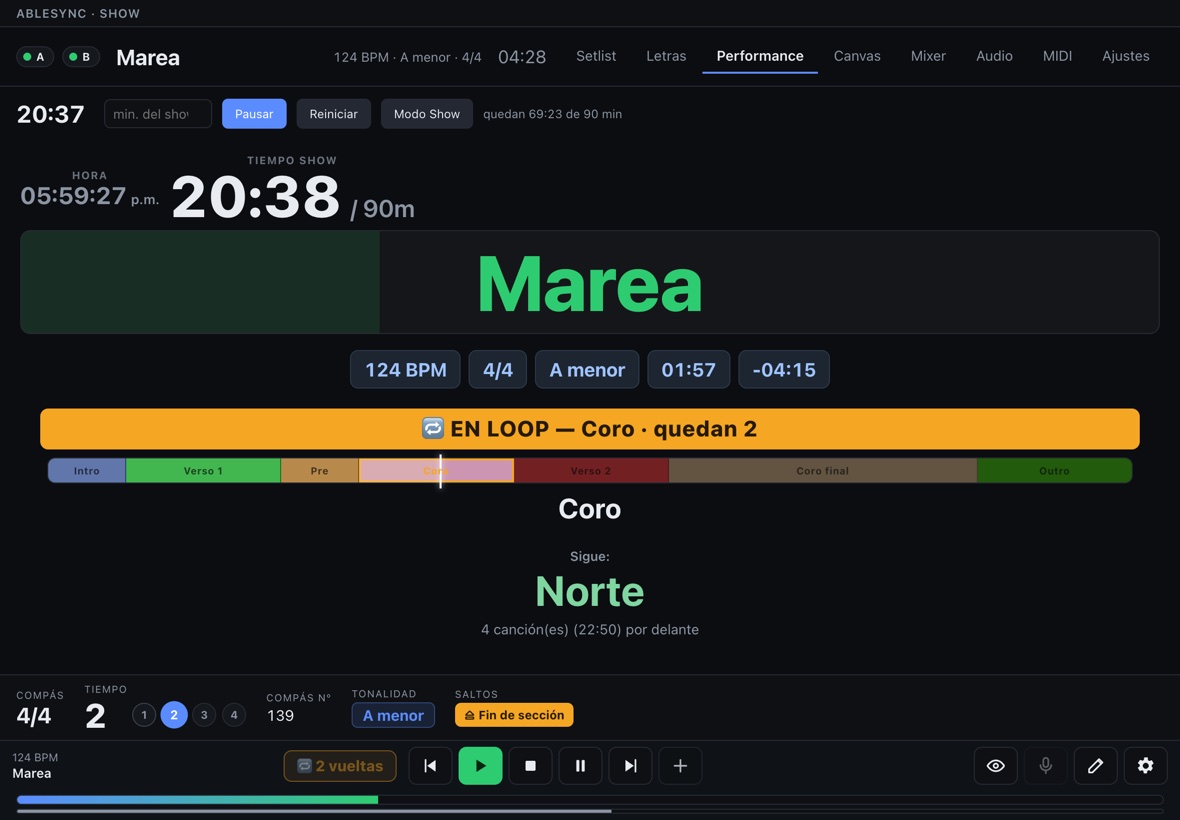
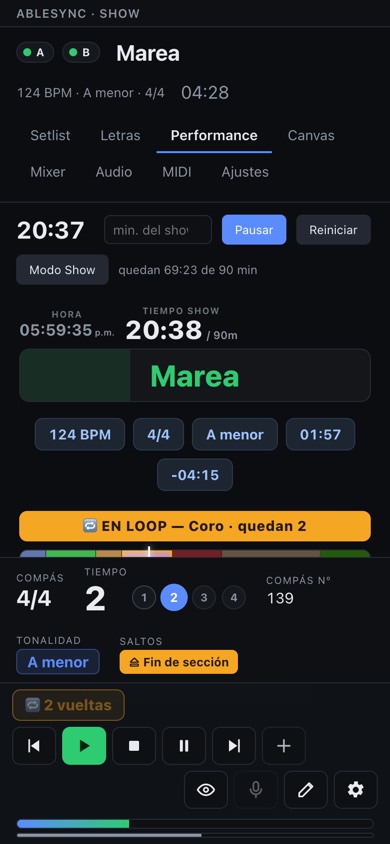
El baterista ve compás y metrónomo; quien canta, la letra en grande. Cada pantalla guarda su propia configuración. Abiertas como repetidoras, ven todo y no mandan nada.
The drummer gets the bar count and click; the singer gets huge lyrics. Each screen keeps its own setup. Opened as repeaters, they see everything and send nothing.
Se abre en cualquier navegador de la red: iPad, laptop o teléfono, sin instalar nada. Si lo prefieres, hay app para iPad y otra para que cada músico mezcle sus in-ears; las dos son opcionales. Para luces, video o un teleprompter hay una salida de solo lectura, /now.json.
It opens in any browser on the network: iPad, laptop or phone, with nothing to install. If you'd rather, there's a Canvas app for iPhone and iPad and another so each musician can mix their own in-ears; both are optional. For lights, video or a teleprompter there's a read-only feed, /now.json.
El MIDI a hardware es un estado, no un evento.Hardware MIDI is a state, not an event.
Tus aparatos llegan al patch que les tocaYour gear lands on the right patch
Saltas al coro y el sinte igual llega al patch correcto: se vuelve a afirmar al saltar, al arrancar y cuando conectas el aparato. Un cambio de programa de Ableton, en cambio, se pierde si el cabezal no lo cruza.
Jump to the chorus and the synth still lands on the right patch: it's re-asserted on jump, on start, and when you plug the device in. An Ableton program change, by contrast, is lost if the playhead never crosses it.
El Auto-Tune sigue tu tonalidadAuto-Tune follows your key
Una pista con la tonalidad por clip, y AbleSync le manda Key y Scale al plugin por MIDI. Donde no hay clip, pasa a cromático en vez de afinar en el tono equivocado.
A track with one clip per key change, and AbleSync sends Key and Scale to the plugin over MIDI. Where there's no clip it goes chromatic, instead of tuning to the wrong key.
El cue dice a dónde vas de verdad.The cue calls where you're actually going.
AbleSync dice la sección que viene («verso», «coro», «puente») uno o dos compases antes, en los in-ears. No hay que acomodar clips de cues en cada canción: sale del nombre de tus secciones. Y como sabe qué va a sonar, dice lo que va a sonar: un clip de cue grabado diría «coro» aunque hayas encolado el puente.
AbleSync calls the next section ("verse", "chorus", "bridge") one or two bars ahead, in the in-ears. No cue clips to lay out in every song: it comes from your section names. And because it knows what's about to play, it calls what's about to play: a recorded cue clip would still say "chorus" after you queued the bridge.
| Lo que pasaWhat happens | Lo que diceWhat it says |
|---|---|
| Encolaste un salto al PuenteYou queued a jump to the Bridge | «Puente», no la sección que seguía."Bridge", not the section that was next. |
Intro >>> CoroIntro >>> Chorus | «Coro», antes de que termine la Intro."Chorus", before the Intro ends. |
Puente +SKIPBridge +SKIP | La que sí va a sonar después.The one that will actually play next. |
| Un loop puestoA loop is on | Lo vuelve a decir en cada vuelta.Calls it again on every pass. |
Verso 2Verse 2 | «Verso dos», si tu Drum Rack trae ese pad. Si no, «verso»."Verse two", if your Drum Rack has that pad. If not, "verse". |
COUNT OFF | Nunca se anuncia: dice la que viene después.Never announced: it calls the one that follows. |
Suena por una pista de tu sesión, CUES VOZ: un Drum Rack con un pad por sección, en español o en inglés. Opcionalmente, con conteo «1, 2, 3, 4» en el último compás. AbleSync programa cada cue con adelanto según el tempo. Comprueba su ajuste en tu sesión y con tu salida de audio antes del show.
It plays through a track in your session, CUES VOZ: a Drum Rack with one pad per section, in Spanish or English. Optionally with a "1, 2, 3, 4" count on the last bar. AbleSync schedules each cue ahead of time using the session tempo. Check its timing in your session and with your audio output before the show.
Viene apagado. Si algo falla, lo peor que pasa es que un cue no suene: nunca toca el transporte ni la mezcla. La pista de la plantilla viene con voces en español e inglés, listas para usar: secciones, numeradas y conteo, grabadas por una persona (no son voces sintéticas). Si prefieres otras (las tuyas o un paquete de cues que tengas), AbleSync arma tu pista con ellas desde Ajustes (Armar mi pista de cues), una palabra por archivo. También puede decir el título de la canción — al empezar, en el count-off, o al terminar la anterior — con un audio por canción en los pads de títulos de la misma pista CUES VOZ, nombrado como la canción. Si ya usas pistas de cues con clips, usa una de las dos por set, o se oyen dos veces.
It ships off. If anything fails, the worst case is a cue that doesn't sound: it never touches the transport or the mix. The template's track comes with Spanish and English voices, ready to use: sections, numbered sections and count-in, recorded by a real person (not synthetic voices). If you'd rather use others (your own, or a cue pack you own), AbleSync builds your track with them from Settings (Build my cue track), one word per file. It can also say the song title — as the song starts, during the count-off, or as the previous one ends — with one audio file per song on the title pads of the same CUES VOZ track, named like the song. If you already run cue tracks with clips, use one or the other per set, or you'll hear both.
Tempo desde el nombre del clip.Tempo from the clip name.
Nombra un clip MIDI 120 BPM en la pista TEMPO. Live mantiene ese tempo durante el clip y sube o baja gradualmente en el espacio hasta el siguiente. El cursor prepara el BPM antes de Play. La plantilla incluida ya trae TEMPO MIDI.
Name a MIDI clip 120 BPM on the TEMPO track. Live holds that tempo during the clip and gradually increases or decreases it in the gap before the next clip. The cursor prepares the BPM before Play. The included template already has a MIDI TEMPO track.
Beta opcional. Instala AbleSyncTempo desde Ajustes de AbleSync y selecciónalo una vez en una fila libre de Control Surface de Live, junto a AbletonOSC. Comprobado en Live 12.4.6 con una Mac; actualiza aproximadamente cada 100 ms. No controla tempo con Link, Tempo Follower o automatización de tempo activos. Esta función aún no está habilitada para A/B.
Optional beta. Install AbleSyncTempo from AbleSync Settings, then select it once in a free Control Surface slot in Live, alongside AbletonOSC. Tested in Live 12.4.6 on one Mac; updates run approximately every 100 ms. It does not control tempo while Link, Tempo Follower or tempo automation is active. A/B is not yet enabled for this feature.
Tu propia superficie de control, en iPhone y iPad.Your own control surface, on iPhone and iPad.
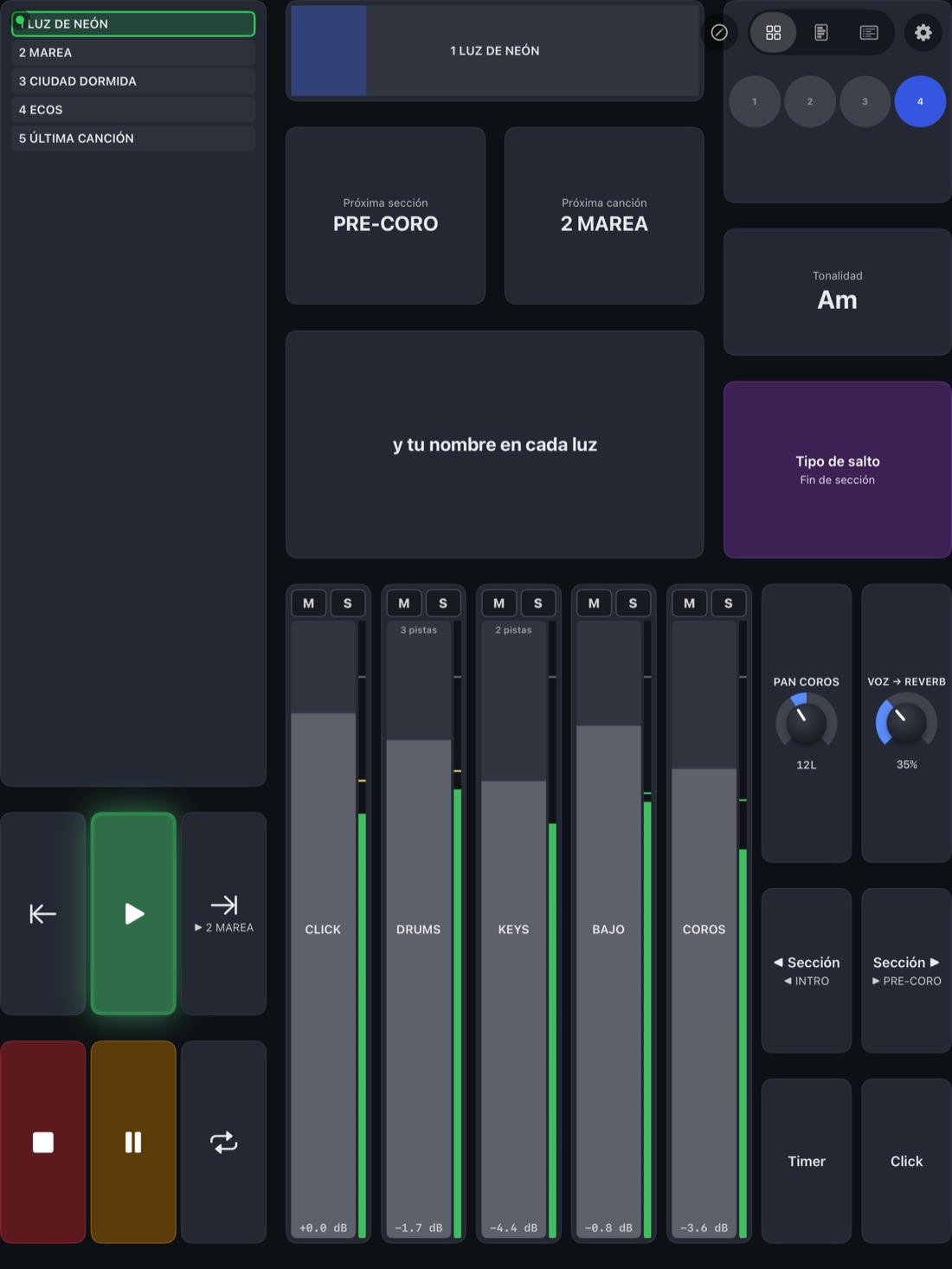
AbleSync Canvas trae el Canvas, la vista Performance y el dashboard completo. Se conecta a la Mac por la red o por cable USB, sin Wi-Fi.
AbleSync Canvas brings the Canvas, the Performance view and the full dashboard. It connects to the Mac over the network or by USB cable, with no Wi-Fi.
El Canvas lo armas con baldosas: transporte, saltos con el destino a la vista, faders con mute y solo, MIDI, OSC, talkback, letra, tonalidad, click visual. Se guarda en la Mac y se abre igual en el navegador.
You build the Canvas from tiles: transport, jumps with the destination in view, faders with mute and solo, MIDI, OSC, talkback, lyrics, key, visual click. It's saved on the Mac and opens the same in the browser.
PerillasKnobs
En la Mac y en el iPad: MIDI CC, volumen, paneo, envíos a tus Returns, y parámetros de un plugin o macros de un Rack. La perilla encuentra el plugin por su nombre: si lo mueves de lugar en la cadena, lo sigue; si ya no está, no mueve nada.
On the Mac and the iPad: MIDI CC, volume, pan, sends to your Returns, and plugin parameters or Rack macros. A knob finds its plugin by name: move the plugin along the chain and the knob follows it; remove it and the knob moves nothing.
PresetsPresets
Al crear un Canvas empiezas de cero o de uno armado: Show completo, Transporte, Mezcla, Baterista o Atril / letras. Los que traen faders los llenan con los canales de tu set. Las perillas quedan sin asignar, para que no muevan algo que nadie escogió.
A new Canvas starts empty or from a ready-made layout: Full show, Transport, Mix, Drummer or Lyrics stand. The ones with faders fill them with your set's channels. Knobs start unassigned, so they don't move anything nobody picked.
Gratis. Funciona con la licencia de AbleSync para Mac, que vive en la Mac: la app no la trae ni la pide. Sin Mac, solo corre un modo demo con un show simulado. Interfaz en español.
Free. It works with your AbleSync for Mac licence, which lives on the Mac: the app neither includes nor asks for one. Without a Mac, it only runs a demo mode with a simulated show. Interface in Spanish.
Pronto en la App StoreComing soon to the App Store
Cada músico mezcla sus in-ears desde su teléfono.Each musician mixes their own in-ears from their phone.
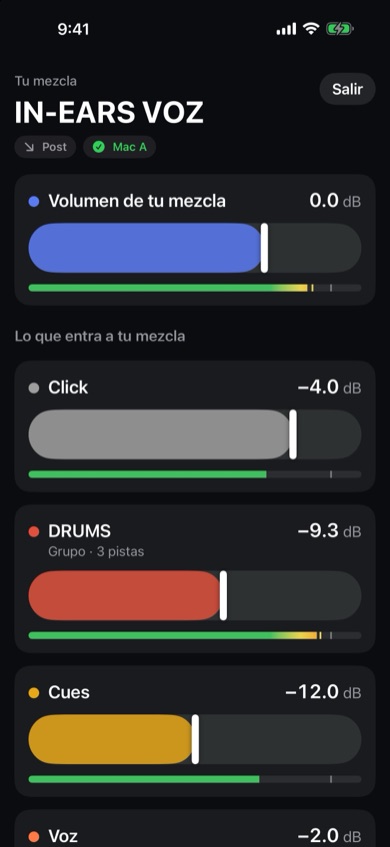
Con AbleSync Monitor (iPhone y iPad), cada mezcla de in-ear es un Return de Ableton con su clave. Quien la escribe mueve cuánto de cada canal entra a su Return, y su volumen. Nada más: ni el Main, ni la mezcla de otro, ni el transporte.
With AbleSync Monitor (iPhone and iPad), each in-ear mix is an Ableton Return with its own key. Whoever types it moves how much of each channel feeds their Return, and its level. Nothing else: not the Main, not anyone else's mix, not the transport.
- Un VU en cada fader, en dB como el de Ableton: ves qué está sonando antes de subirlo.
- El músico puede agregar canales que todavía no están en su mezcla. Se apaga por Return, en la Mac, si prefieres que solo balancee lo que tú pusiste.
- Armar mezcla, desde la Mac: deja lista la mezcla de un Return nuevo en un clic, con todo a un nivel de partida o copiada de otro Return.
- Mac A y B: la mezcla del músico se mueve en las dos a la vez.
- A meter on every fader, in dB like Ableton's: you see what's playing before you bring it up.
- Musicians can add channels that aren't in their mix yet. Turn it off per Return, on the Mac, if you'd rather they only balance what you put there.
- Build a mix from the Mac: sets up a new Return's mix in one click, everything at a starting level or copied from another Return.
- Mac A and B: the musician's mix moves on both at once.
Returns en Pre: PRE MUTEPre-fader Returns: PRE MUTE
Un envío en Pre toma la señal antes del mute de la pista: mutear el talkback, el click o una guía no las calla en los in-ears. Pon un Utility llamado PRE MUTE al final de esas pistas y AbleSync lo apaga y lo prende junto con el mute, también si muteas a mano en Live. El nivel del envío sigue siendo del músico.
A Pre send taps the signal before the track's mute: muting talkback, click or a guide doesn't silence them in the in-ears. Put a Utility named PRE MUTE at the end of those tracks and AbleSync switches it with the mute, even when you mute by hand in Live. The send level stays the musician's.
El volumen del Return desde el teléfono necesita el parche de AbletonOSC que trae AbleSync; sin él se mueven los canales, no el Return. Si el Return está en Post, lo que oye el músico también depende de tus faders. Interfaz en español.
Moving the Return level from the phone needs the AbletonOSC patch that ships with AbleSync; without it the channels move, the Return doesn't. If the Return is Post-fader, what the musician hears also depends on your faders. Interface in Spanish.
Pronto en la App StoreComing soon to the App Store
Gratis, y la instala cada músico. Funciona con la licencia de AbleSync para Mac; sin un show corriendo en la Mac, solo el modo demo. Cómo se conecta y cómo se pone la clave de cada Return: Soporte.
Free, and each musician installs it. It works with the AbleSync for Mac licence; without a show running on the Mac, only the demo mode. How to connect it and set a key per Return: Support.
Revisión por Mac, con resultados vigentes.Checks per Mac, with current results.
Selecciona una Mac o el par A/B. Cada máquina tiene su resultado: errores, advertencias o una revisión pendiente. Si pierde la conexión o cambia la sesión, el resultado deja de darse por vigente. La guía Preparar show te lleva desde la conexión hasta esta revisión.
Select one Mac or your A/B pair. Each machine has its own result: errors, warnings or a pending check. If its connection is lost or the session changes, that result is no longer treated as current. The Preparar show guide takes you from connection to this check.
- Que las canciones del setlist sigan existiendo en Ableton.That your setlist songs still exist in Ableton.
- Que ningún salto de sección apunte a una sección borrada.That no section jump points at a deleted section.
- Que cada aparato MIDI tenga puerto.That every MIDI device has a port.
- Que el número de compás esté bien medido, aunque el set cambie de métrica.That the bar count is properly measured, even when the set changes meter.
Cada aviso dice qué pasa y qué hacer. Hay una captura real en Inicio.
Every warning says what's wrong and what to do. There's a real screenshot on Home.
Si ya usas TouchOSC con AbleSet.If you already run TouchOSC with AbleSet.
AbleSync escucha el mismo esquema de direcciones OSC y en el mismo puerto, a propósito: tu plantilla funciona casi sin tocarla. Lo que AbleSet no tiene vive bajo /ablesync/.
AbleSync listens on the same OSC address scheme, on the same port, on purpose: your template works with barely a change. Anything AbleSet doesn't have lives under /ablesync/.
El puerto viene apagado de fábrica. Un puerto OSC abierto es control del show para cualquiera en la red, y en un festival con wifi compartida eso no es teórico.
The port ships off. An open OSC port is show control for anyone on the network, and on shared festival wi-fi that isn't theoretical.
Lo que todavía no hace.What it doesn't do yet.
Escrito aquí y no escondido en un foro, porque enterarte de esto después de pagar es peor para los dos.
Written here instead of buried in a forum, because finding this out after paying is worse for both of us.
- Windows. Es macOS, y hoy solo Apple Silicon. Una Mac Intel no puede abrirlo.
- Interfaz solo en español, en la Mac y en las apps. La versión en inglés está en camino. (Los cues de voz sí pueden ir en inglés.)
- Los cues de voz vienen solo en español e inglés. Grabados por una persona y listos para usar; si prefieres otras (las tuyas o un paquete de cues que tengas), AbleSync arma tu pista con ellas desde Ajustes.
- No genera ni lee LTC. Calcula el timecode desde la posición del Arrangement para que lo compares de un vistazo. Con cambios de tempo, la cuenta se desvía.
- Sin acordes, sin DMX, sin video. Para luces y video está la salida de solo lectura
/now.json. - El dashboard no pide contraseña de fábrica. Puedes configurar una clave de control en la Mac. Sin esa clave configurada, quien abra la dirección desde tu red puede controlar. Usa una red dedicada al show.
- Es nuevo. No hay testimonios porque todavía no hay usuarios. Cuando los haya, van a hablar ellos y no yo.
- Windows. macOS only, and today Apple Silicon only. An Intel Mac can't open it.
- Spanish interface only, on the Mac and in the apps. An English UI is in progress. This site isn't the app. (Voice cues can be in English.)
- Voice cues come in Spanish and English only. Recorded by a real person and ready to use; if you'd rather use others (your own, or a cue pack you own), AbleSync builds your track with them from Settings.
- It doesn't generate or read LTC. It calculates timecode from arrangement position so you can eyeball a match. With tempo changes, the count drifts.
- No chords, no DMX, no video. For lights and video there's a read-only feed,
/now.json. - The dashboard has no password out of the box. Anyone on your network who opens the address has control. Use a show network, not venue wi-fi.
- It's new. No testimonials, because there are no users yet. When there are, they'll do the talking.
Qué hace falta.What you need.
- Una Mac con Apple Silicon por cada máquina de playback, con Ableton Live 11 o 12.
- AbletonOSC, que viene dentro de AbleSync y se instala desde el propio panel.
- Una red, de preferencia por cable. Para un show, la diferencia entre que funcione siempre y que funcione casi siempre.
- Un navegador en lo que quieras usar como pantalla. No hace falta instalar nada ahí.
- Opcional, y gratis: un iPhone o iPad con iOS/iPadOS 17 o posterior para Canvas, y el iPhone o iPad de cada músico (iOS 17 o posterior) para Monitor. Las dos apps usan la licencia de tu Mac.
- An Apple Silicon Mac per playback machine, running Ableton Live 11 or 12.
- AbletonOSC, which ships inside AbleSync and installs from its own panel.
- A network, preferably wired. For a show, that's the difference between always and almost always.
- A browser on whatever you're using as a screen. Nothing to install there.
- Optional, and free: an iPhone or iPad on iOS/iPadOS 17 or later for Canvas, and each musician's iPhone or iPad (iOS 17 or later) for Monitor. Both apps use your Mac's licence.